Open Source · MIT License · v0.2.0

Summarize. Chunk. Embed.
Ship Faster.

Partio is a containerized summarization, chunking and embeddings controller that simplifies document processing for RAG pipelines, semantic search, and AI applications. Three containers. One API. Every language. Ollama, OpenAI, Gemini, and vLLM all fit.

MIT License Docker Ready C# · Python · JS SDKs Multi-Tenant RESTful API React Dashboard LLM Summarization
terminal
# Start Partio with Docker Compose
$ curl -o compose.yaml \
    https://raw.githubusercontent.com/jchristn/Partio/main/docker/compose.yaml
$ docker compose up -d

# Summarize, chunk, and embed a document
$ curl -X POST http://localhost:8400/v1.0/process \
    -H "Authorization: Bearer default" \
    -H "Content-Type: application/json" \
    -d '{
      "Type": "Text",
      "Text": "Partio makes chunking and embedding easy.",
      "SummarizationConfiguration": {
        "CompletionEndpointId": "cep_default",
        "Order": "TopDown"
      },
      "ChunkingConfiguration": {
        "Strategy": "FixedTokenCount",
        "FixedTokenCount": 256
      },
      "EmbeddingConfiguration": {
        "EmbeddingEndpointId": "eep_default"
      }
    }'

{"Text":"Partio makes chunking...","Chunks":[{"Text":"...","Embeddings":[0.012,-0.045,...]}]}

Why Partio?

Stop building summarization, chunking, and embedding infrastructure from scratch. Partio gives you production-ready document processing in minutes.

Three Containers, Done

Just docker compose up and pull your models. No cluster management, no complex infrastructure.

LLM-Powered Summarization

Generate intelligent summaries of your content before chunking and embedding. Choose between top-down or bottom-up strategies with configurable prompts and retry logic.

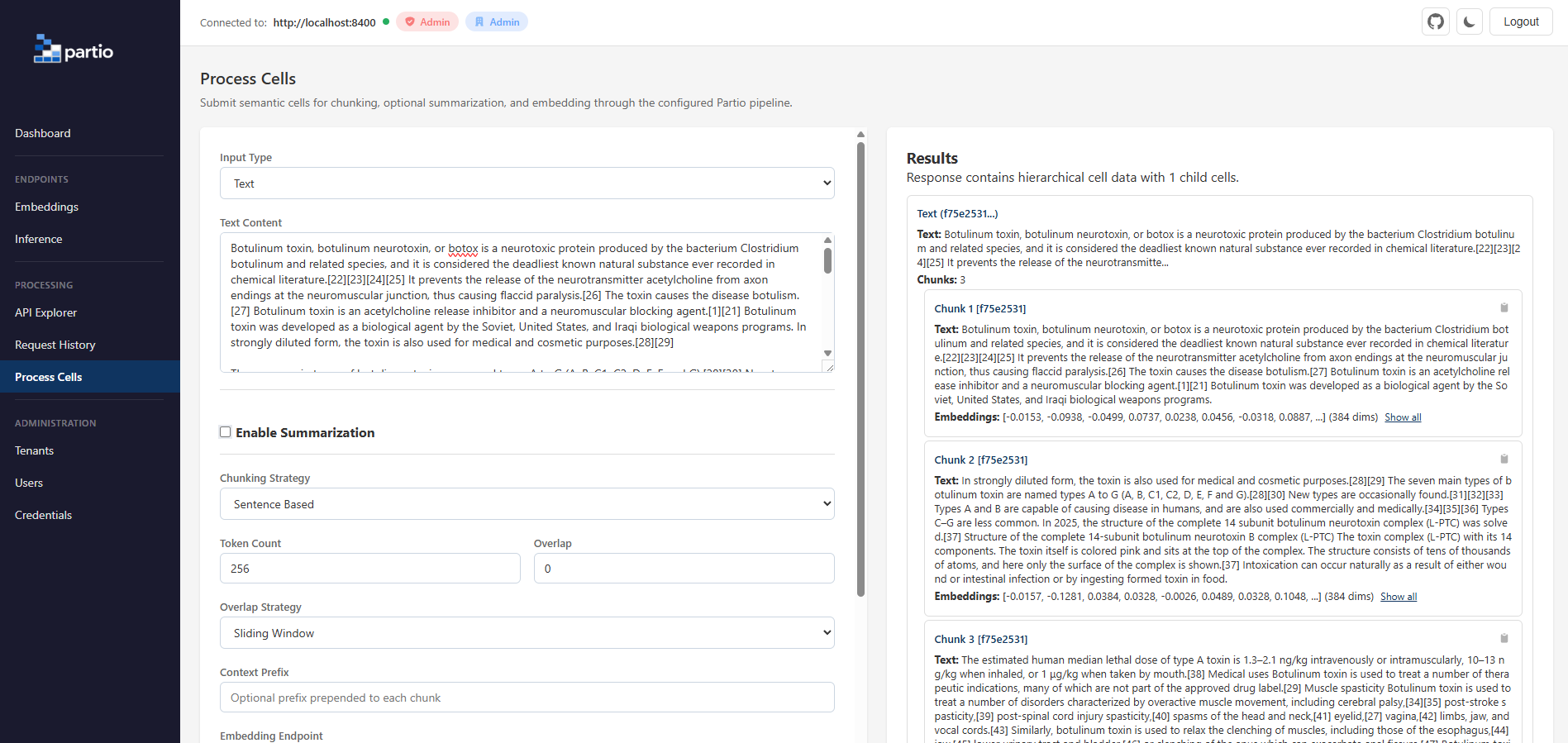
Semantic Cell Processing

Process text, code, lists, tables, hyperlinks, images, and more. Partio understands your data structure and chunks it intelligently based on content type.

11 Chunking Strategies

Fixed token count, sentence-based, paragraph-based, regex-based, table rows, key-value pairs, and more. Use overlap and sliding windows for context continuity.

Multi-Tenant by Design

Isolate teams, customers, or environments with built-in multi-tenancy. Each tenant gets their own users, credentials, and embedding endpoints.

SDKs for Every Stack

Native SDKs for C#, Python, and JavaScript. Zero-dependency JS client using native fetch. Full async support across all languages.

Bring Your Own Provider

Works with Ollama, OpenAI, Gemini, vLLM, Azure OpenAI, LocalAI, or other compatible APIs. Background health checks ensure endpoint reliability.

Everything You Need

Partio handles the hard parts of summarization, chunking, and embedding so you can focus on building your application.

Processing

  • LLM-powered summarization with top-down and bottom-up strategies
  • Hierarchical semantic cells with parent-child relationships
  • Completion endpoint management for inference/summarization
  • 8 semantic cell types (Text, Code, List, Table, Hyperlink, Meta, Binary, Image)
  • 11 chunking strategies with configurable overlap
  • Sliding window overlap for context continuity
  • Context prefix injection per chunk
  • Batch processing for high-throughput workloads
  • L2 normalization for cosine similarity
  • Deterministic, reproducible chunking output

Infrastructure

  • Docker containers for server and dashboard
  • Multi-architecture builds (amd64, arm64)
  • 4 database backends (SQLite, PostgreSQL, MySQL, SQL Server)
  • Zero-config SQLite default for quick start
  • Stateless server for horizontal scaling
  • Background health checks with configurable thresholds
  • Automatic request gating for unhealthy endpoints

Security & Operations

  • Multi-tenant isolation at the database level
  • Three-tier authentication (Admin, Credential, Public)
  • Scoped bearer tokens per tenant and user
  • Request history with full audit logging
  • Upstream embedding and completion call tracking
  • Configurable retention and automatic cleanup
  • Postman collection with 50+ pre-built requests

How It Works

Partio sits between your application and your providers, handling summarization, chunking, embedding, and provider management across Ollama, OpenAI, Gemini, and vLLM.

Your Application C# / Python / JS / cURL
REST API / SDK
Partio Server :8400 · Summarize · Chunk · Embed
Partio Dashboard :8401 · React · Admin UI
Embedding & Completion Calls
Ollama Local / Self-hosted
OpenAI Cloud API
Gemini Google AI / Vertex-ready
vLLM OpenAI-compatible / Self-hosted

Built for Your Workflow

Whether you're building RAG pipelines, semantic search, or AI-powered applications, Partio fits right in.

RAG Pipelines

Chunk documents into semantically meaningful pieces and generate embeddings in a single API call. Feed directly into your vector store for retrieval-augmented generation.

AI Engineers

Semantic Search

Generate high-quality embeddings for search indexes. Support multiple chunking strategies to optimize recall and precision for your specific corpus.

Data Scientists

Document Processing

Process tables, code blocks, lists, and mixed-format documents with type-aware chunking. Each content type gets the strategy it deserves.

Developers

Knowledge Base Ingestion

Batch-process your knowledge base through a REST API. Partio handles the chunking and embedding so your ingestion pipeline stays clean and focused.

Developers

Multi-Tenant SaaS

Serve multiple customers from a single deployment with isolated tenants, scoped credentials, and per-tenant embedding endpoints. Built-in audit logging included.

DevOps

Model Experimentation

Switch between embedding providers without changing application code. Compare Ollama, OpenAI, Gemini, and vLLM side by side using the same chunking strategies.

Data Scientists

Table & Structured Data

Five specialized table chunking strategies: row-based, row with headers, grouped rows, key-value pairs, and whole-table. Perfect for CSV, Excel, and database exports.

AI Engineers

Observability & Debugging

Full request history with upstream embedding call tracking. See exactly what was sent to your provider, what came back, and how long it took.

DevOps

Why Not Roll Your Own?

You could build summarization, chunking, and embedding infrastructure yourself. Here's what that looks like compared to Partio.

Capability DIY Approach Partio
Setup time Days to weeks Minutes
Summarization Custom LLM integration Built-in top-down & bottom-up strategies
Chunking strategies Build each one yourself 11 strategies, configurable
Embedding & inference providers Hard-coded per provider Ollama, OpenAI, Gemini, and vLLM
Multi-tenancy Custom auth & isolation Built-in tenant isolation
Health monitoring Build from scratch Automatic background checks
Request auditing Custom logging Full audit trail with upstream tracking
Admin dashboard Build or skip React dashboard included
SDKs Write your own clients C#, Python, JS ready to go
Database support Pick one, build schema SQLite, PostgreSQL, MySQL, SQL Server
Deployment Custom Docker/CI docker compose up
Maintenance You own it forever Community-maintained, MIT licensed

Simple by Design

Summarize, chunk, and embed documents in just a few lines of code, in any language.

# Summarize, chunk, and embed a text document
curl -X POST http://localhost:8400/v1.0/process \
  -H "Authorization: Bearer default" \
  -H "Content-Type: application/json" \
  -d '{
    "Type": "Text",
    "Text": "RAG improves LLM responses by grounding them...",
    "SummarizationConfiguration": {
      "CompletionEndpointId": "cep_default",
      "Order": "TopDown"
    },
    "ChunkingConfiguration": { "Strategy": "SentenceBased" },
    "EmbeddingConfiguration": { "EmbeddingEndpointId": "eep_default" }
  }'

# Process without summarization (chunking + embedding only)
curl -X POST http://localhost:8400/v1.0/process \
  -H "Authorization: Bearer default" \
  -H "Content-Type: application/json" \
  -d '{
    "Type": "Text",
    "Text": "# Introduction\nWelcome.\n# Setup\nInstall deps.",
    "ChunkingConfiguration": { "Strategy": "RegexBased", "RegexPattern": "^# " },
    "EmbeddingConfiguration": { "EmbeddingEndpointId": "eep_default" }
  }'
from partio_sdk import PartioClient

# Connect to Partio
with PartioClient("http://localhost:8400", "partioadmin") as client:

    # Check server health
    health = client.health()
    print(f"Server: {health['Status']} v{health['Version']}")

    # Summarize, chunk, and embed a text document
    result = client.process({
        "Type": "Text",
        "Text": "RAG improves LLM responses by grounding them...",
        "SummarizationConfiguration": {
            "CompletionEndpointId": "cep_default",
            "Order": "TopDown"
        },
        "ChunkingConfiguration": { "Strategy": "SentenceBased" },
        "EmbeddingConfiguration": { "EmbeddingEndpointId": "eep_default" }
    })

    # Access chunks and embeddings
    for chunk in result["Chunks"]:
        print(f"Chunk: {chunk['Text'][:50]}...")
        print(f"Embedding dims: {len(chunk['Embeddings'])}")
import { PartioClient } from './partio-sdk.js';

// Connect to Partio (zero dependencies, native fetch)
const client = new PartioClient('http://localhost:8400', 'partioadmin');

// Summarize, chunk, and embed a text document
const result = await client.process({
  Type: 'Text',
  Text: 'RAG improves LLM responses by grounding them...',
  SummarizationConfiguration: {
    CompletionEndpointId: 'cep_default',
    Order: 'TopDown'
  },
  ChunkingConfiguration: { Strategy: 'FixedTokenCount', FixedTokenCount: 256 },
  EmbeddingConfiguration: { EmbeddingEndpointId: 'eep_default' }
});

console.log(`Chunks: ${result.Chunks.length}`);
using Partio.Sdk;
using Partio.Sdk.Models;

// Connect to Partio
using var client = new PartioClient("http://localhost:8400", "partioadmin");

// Summarize, chunk, and embed a text document
var response = await client.ProcessAsync(new SemanticCellRequest
{
    Type = "Text",
    Text = "RAG improves LLM responses...",
    SummarizationConfiguration = new SummarizationConfiguration
    {
        CompletionEndpointId = "cep_default",
        Order = "TopDown"
    },
    ChunkingConfiguration = new ChunkingConfiguration
    {
        Strategy = "SentenceBased"
    },
    EmbeddingConfiguration = new EmbeddingConfiguration
    {
        EmbeddingEndpointId = "eep_default"
    }
});

Summarization Strategies

Optionally summarize your content before chunking and embedding. Partio uses LLM-powered inference endpoints to generate intelligent summaries.

TopDown

Summarize parent cells first, then children. Context flows downward, providing each child with the parent's summary for richer, contextually-aware summaries.

All cell types

BottomUp

Summarize leaf cells first, then work upward. Parent summaries incorporate child summaries, building a comprehensive understanding from the ground up.

All cell types

Chunking Strategies

Choose the right chunking strategy for your content type. Mix and match across different document sections.

FixedTokenCount

Split into chunks of N tokens using cl100k_base encoding. Supports configurable overlap.

All types

SentenceBased

Split at sentence boundaries for natural, readable chunks that preserve meaning.

All types

ParagraphBased

Split at paragraph boundaries to keep related content together in each chunk.

All types

WholeList

Treat the entire list as a single chunk, preserving the complete list context.

Lists only

ListEntry

Each list item becomes its own chunk, ideal for FAQ-style or itemized content.

Lists only

Row

Each table row as a space-separated chunk without headers.

Tables only

RowWithHeaders

Each row as a markdown table with column headers repeated, providing context per chunk.

Tables only

RowGroupWithHeaders

Groups of N rows with headers. Balance between context and chunk size.

Tables only

KeyValuePairs

Rows formatted as "key: value" pairs, natural for structured data extraction.

Tables only

WholeTable

The entire table as a single markdown-formatted chunk.

Tables only

RegexBased

Split at boundaries defined by a user-supplied regular expression. Ideal for Markdown headings, log timestamps, LaTeX sections, or any structured format.

All types

Get Started in Minutes

Choose your preferred deployment method. Partio runs anywhere Docker runs.

1

Download the Compose file

curl -o compose.yaml \
  https://raw.githubusercontent.com/jchristn/Partio/main/docker/compose.yaml
curl -o partio.json \
  https://raw.githubusercontent.com/jchristn/Partio/main/docker/partio.json
2

Start the services

docker compose up -d
3

Pull an embedding model

# Bash / macOS / Linux
curl http://localhost:11434/api/pull -d '{"name": "all-minilm"}'

# Windows Terminal (cmd)
curl http://localhost:11434/api/pull -d "{\"name\": \"all-minilm\"}"
4

Pull a completion model (for summarization)

# Bash / macOS / Linux
curl http://localhost:11434/api/pull -d '{"name": "gemma3:4b"}'

# Windows Terminal (cmd)
curl http://localhost:11434/api/pull -d "{\"name\": \"gemma3:4b\"}"
5

Verify it's running

# Server health check
curl http://localhost:8400/
{"Status":"Healthy","Version":"0.2.0"}

# Open the dashboard
open http://localhost:8401
Default ports: Server on :8400, Dashboard on :8401
Default admin key: partioadmin
Default credential: Bearer default
Default database: SQLite (zero configuration)
1

Run the Partio server

docker run -d \
  --name partio-server \
  -p 8400:8400 \
  -v ./data:/app/data \
  -v ./logs:/app/logs \
  jchristn77/partio-server:latest
2

Run the dashboard

docker run -d \
  --name partio-dashboard \
  -p 8401:8401 \
  jchristn77/partio-dashboard:latest
Images: jchristn77/partio-server · jchristn77/partio-dashboard
Architectures: linux/amd64, linux/arm64
1

Clone the repository

git clone https://github.com/jchristn/Partio.git
cd Partio
2

Build and run the server

# Requires .NET 10.0 SDK
cd src/Partio.Server
dotnet build
dotnet run
3

Build and run the dashboard

# Requires Node.js 18+
cd dashboard
npm install
npm run dev
Prerequisites: .NET 10.0 SDK, Node.js 18+
Repository: github.com/jchristn/Partio

Manage Everything from the Dashboard

A full-featured React admin dashboard for managing tenants, users, credentials, endpoints, and processing — all from your browser.
Tenant Management

Create and manage tenants with labels, tags, and isolated resources. Full CRUD with pagination and filtering.

User & Credential Admin

Manage users per tenant with role-based access. Generate and revoke bearer token credentials with one click.

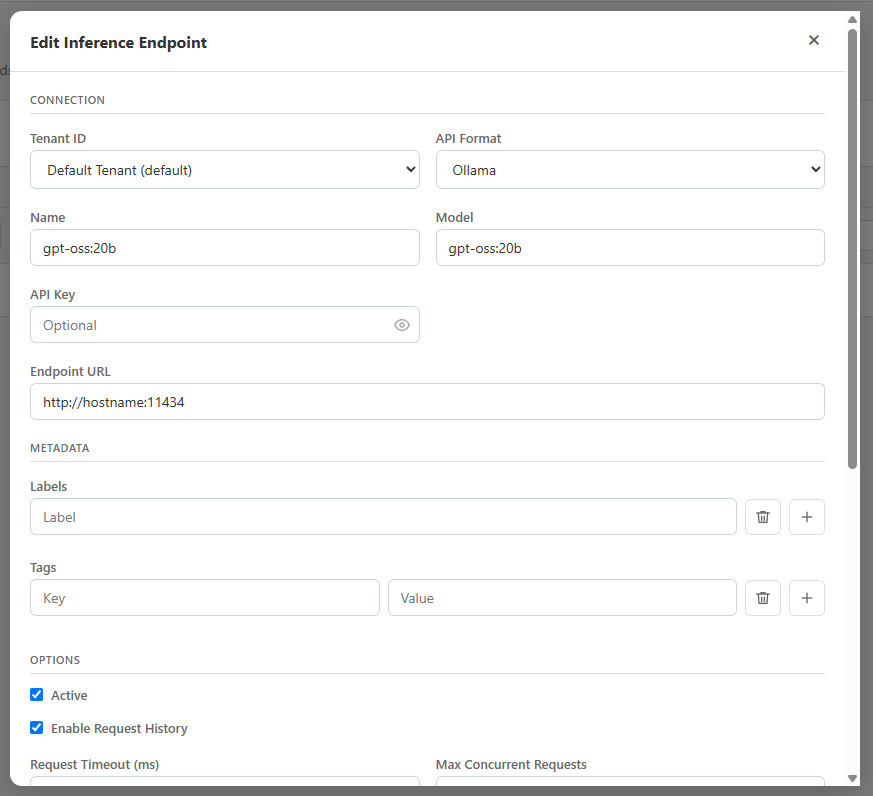
Endpoint Configuration

Configure Ollama, OpenAI, Gemini, and vLLM endpoints. Set health check intervals, thresholds, and monitor endpoint status in real time.

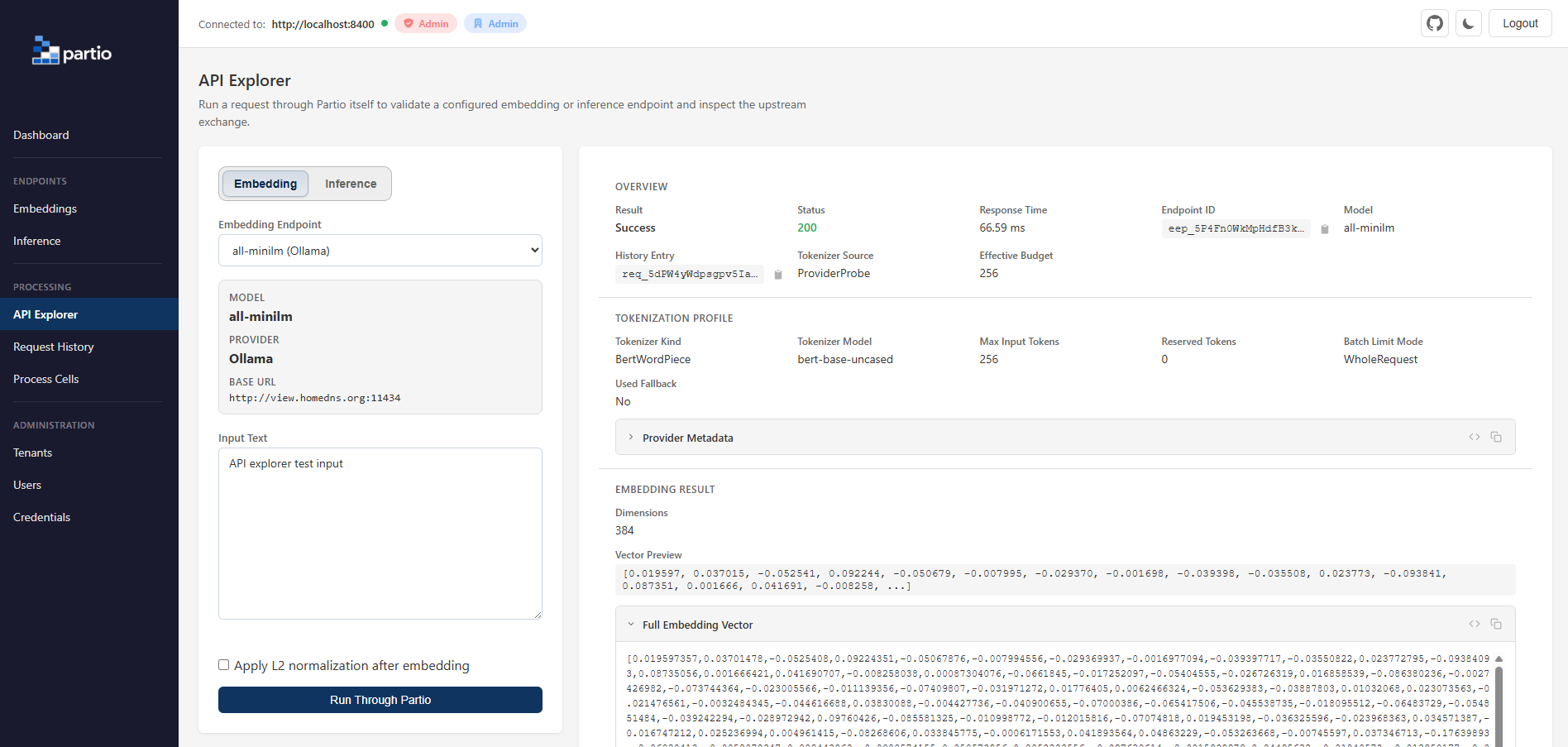
Live Processing Tool

Test chunking and embedding directly in the browser. Select strategies, configure parameters, and inspect results with a built-in JSON viewer.

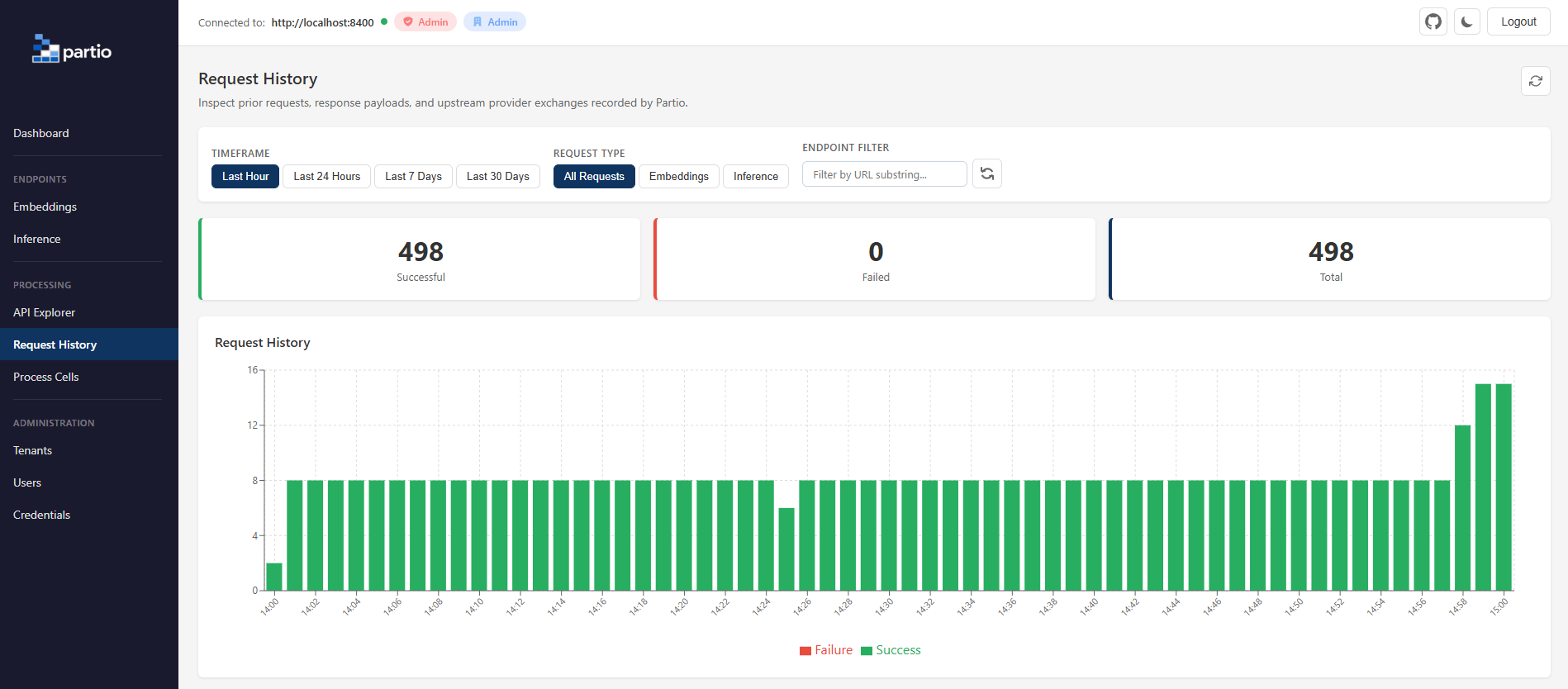
Request History

Browse all API requests with full audit details. Inspect request/response bodies and track upstream embedding calls for debugging.

Health Monitoring

Visual health status for all embedding endpoints. Automatic background checks with configurable thresholds for healthy/unhealthy state transitions.

SDKs for Every Language

Native clients with full API coverage. 30+ methods per SDK, consistent interfaces, and idiomatic patterns for each language.

C#

Partio.Sdk

.NET 8.0 / 10.0
  • Full async/await with Task-based API
  • IDisposable pattern for clean resource management
  • Nullable reference types enabled
  • XML documentation for IntelliSense
using var client = new PartioClient(endpoint, key);
var result = await client.ProcessAsync(request);
View SDK
Py

partio_sdk

Python 3.7+
  • Context manager support (with statement)
  • Session-based HTTP with persistent headers
  • Single dependency: requests>=2.28.0
  • Custom PartioError exception class
with PartioClient(endpoint, key) as client:
    result = client.process(request)
View SDK
JS

partio-sdk

Node.js 18+ / ES6
  • Zero external dependencies (native fetch)
  • ES module with full async/await
  • Works in Node.js and modern browsers
  • Custom PartioError class
const client = new PartioClient(endpoint, key);
const result = await client.process(request);
View SDK

RESTful API

A clean, consistent API with full CRUD operations, pagination, and comprehensive error handling.

Health & Identity

GET /
Health check
GET /v1.0/health
Health with version
GET /v1.0/whoami
Current user identity

Processing

POST /v1.0/process
Chunk & embed a single document
POST /v1.0/process/batch
Batch process multiple documents

Administration

PUT /v1.0/tenants
Create tenant
PUT /v1.0/users
Create user
PUT /v1.0/credentials
Create credential
PUT /v1.0/endpoints/embedding
Create embedding endpoint
PUT /v1.0/endpoints/completion
Create completion endpoint

Endpoint Health

GET /v1.0/endpoints/embedding/{id}/health
Single embedding endpoint health
GET /v1.0/endpoints/embedding/health
All embedding endpoints health
GET /v1.0/endpoints/completion/{id}/health
Single completion endpoint health
GET /v1.0/endpoints/completion/health
All completion endpoints health

Full API reference with request/response examples, authentication details, and error codes.

API Docs Postman

Your Database, Your Choice

Partio supports four database backends. Start with SQLite for zero-config development, scale to PostgreSQL or SQL Server for production.

SQLite

Zero configuration, file-based. Perfect for development, testing, and single-node deployments.

Default

PostgreSQL

Production-grade relational database. Ideal for high-throughput multi-tenant deployments.

MySQL

Widely deployed and well-supported. Great when you're already running MySQL infrastructure.

SQL Server

Enterprise-ready with full feature parity. Fits naturally into Microsoft-centric environments.

Ready to Simplify Your Processing Pipeline?

Partio is free, open source, and MIT licensed. Get started in minutes with Docker or build from source.